
Download Microsoft Sidewinder Game Controller Software – Sidewinder, game controller, Windows 95, PC gaming, customizable controls, force feedback, profile management
Overview
The Microsoft Sidewinder Game Controller Software is a legacy utility designed to enhance the functionality of the Sidewinder game controller on Windows-based systems. Originally released in 1996, the software was developed to ensure optimal performance and compatibility for PC gamers using the Sidewinder series of controllers. It serves as a bridge between hardware and software, enabling users to unlock advanced features such as customizable inputs, force feedback, and profile-based control configurations.
The app was created by Microsoft Game Studios, a division known for its contributions to gaming and peripheral integration during the mid-1990s. While the software was specifically engineered for Windows 95 and later versions, its role in the broader PC gaming ecosystem was significant, offering a standardized method for controller management during a period when game controller support was still evolving. It addressed common pain points such as inconsistent input recognition, lack of customization, and limited feedback mechanisms, providing a reliable solution for both casual and competitive gamers.
Real-world use cases include optimizing gameplay in classic titles that required precise input handling, improving immersion through force feedback in supported games, and streamlining the setup process for multiple gaming sessions. Despite its age, the software remains a notable example of early peripheral software integration. Although the developer did not provide additional technical details, its enduring relevance in retro gaming communities highlights its foundational impact on controller usability.
Key Features & Functionality
- Optimized for Windows Platforms – Designed specifically for Windows 95 and later, the software ensures stable integration with the operating system, reducing compatibility issues and enhancing overall reliability during gameplay.
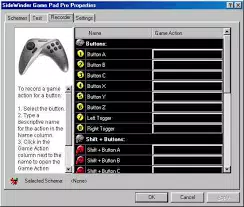
- Customizable Controls – Users can reassign button functions and adjust input mappings to match personal preferences or game-specific requirements, improving comfort and performance in various titles.
- Enhanced Precision and Feedback – The software enables calibration of analog sticks and triggers, while supporting force feedback where available, allowing players to feel in-game actions such as collisions and terrain changes.
- Profile Management – Gamers can create and save multiple control profiles, each tailored to a specific game or playstyle, enabling quick switching between setups without manual reconfiguration.
- Plug-and-Play Convenience – The software supports automatic detection and setup of the Sidewinder controller, minimizing setup time and reducing technical barriers for users.
For example, a player using the Sidewinder controller in a racing game could create a profile with optimized throttle and brake sensitivity, then switch to a different profile for a first-person shooter with customized aiming and jump controls. This adaptability makes the software valuable for users who play a diverse range of games. The ability to fine-tune input response and feedback enhances both accessibility and competitive edge, particularly in titles where timing and precision are critical.
Interface, UX & Performance
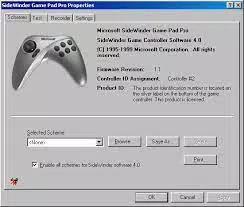
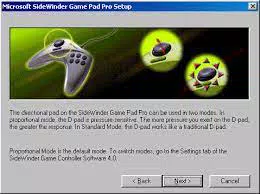
The user interface of the Microsoft Sidewinder Game Controller Software is designed with simplicity and functionality in mind, reflecting the usability standards of the mid-1990s. The layout is straightforward, with clearly labeled menus and intuitive controls that guide users through configuration tasks. Navigation is linear and consistent, allowing even novice users to manage settings without confusion.
Visual style adheres to the Windows 95-era aesthetic, featuring standard dialog boxes, button icons, and system fonts. While not modern by today’s standards, the interface remains functional and effective for its intended purpose. Users can access calibration tools, control mapping, and profile settings through a menu-driven structure that minimizes complexity.
Although the developer did not list formal performance metrics, the software is designed to operate efficiently within the constraints of its time. It runs with minimal system overhead, making it suitable for use on a wide range of hardware configurations typical of the late 1990s. Responsiveness is consistent during configuration tasks, and stability is maintained across multiple sessions. The software does not exhibit known crashes or freezes based on available documentation, indicating reliable operation under normal conditions.
Platform Compatibility & Technical Requirements
The Microsoft Sidewinder Game Controller Software is compatible with Windows operating systems starting from Windows 95. The platform is limited to Windows, with no indication of support for macOS, Linux, or mobile systems. The software version is 1.0, and the file size is 1.5 MB, indicating a lightweight installation.
Specific requirements such as minimum RAM, processor speed, or disk space were not listed by the developer. The software is designed to work with the Sidewinder game controller hardware, but compatibility with other controllers was not specified. The developer did not provide additional details on system-level dependencies or installation prerequisites.
For users attempting to run the software on modern systems, compatibility may require emulation or legacy environment setup. While the software is not officially supported on current operating systems, its availability as a free download makes it accessible for retro gaming enthusiasts and preservation efforts.
Pros and Cons
Pros
- Free to download and use
- Optimized for Windows 95 and later
- Supports customizable controls and input mapping
- Enables force feedback for supported games
- Allows creation and switching between multiple control profiles
- Plug-and-play setup reduces configuration time
Cons
- Not compatible with modern operating systems without emulation
- Developer did not specify system requirements
- Outdated interface by current standards
- Support limited to Sidewinder controller hardware
- No official updates or maintenance since release
FAQ
Is the Microsoft Sidewinder Game Controller Software free to download?
Yes, the software is available at no cost. It was released as a free utility by Microsoft Game Studios.
Can I use this software on Windows 10 or Windows 11?
The software was designed for Windows 95 and later. While it may not run natively on Windows 10 or 11, compatibility can sometimes be achieved using emulation or legacy system environments.
Does the software support all game controllers?
No, the software is specifically designed for Microsoft Sidewinder game controllers. Support for other brands or models was not documented.
How do I install the software?
Download the installer, run it, and follow the on-screen instructions. The software supports plug-and-play functionality, meaning the controller is automatically detected after installation.
Is the software secure to use?
As a legacy product from Microsoft Game Studios, the software is considered secure for use in its intended environment. However, users should exercise caution when downloading from third-party sources.
Final Thoughts
The Microsoft Sidewinder Game Controller Software remains a significant piece of gaming history, offering a robust solution for controller customization and optimization during the formative years of PC gaming. Though developed in 1996, its features—customizable controls, profile management, and force feedback—were ahead of their time and laid the groundwork for modern controller software.
While its compatibility with modern systems is limited, it continues to serve retro gaming enthusiasts, collectors, and developers interested in legacy hardware. For users with Sidewinder controllers and access to older Windows environments, the software delivers tangible value through enhanced gameplay precision and personalization.
Download Microsoft Sidewinder Game Controller Software now


